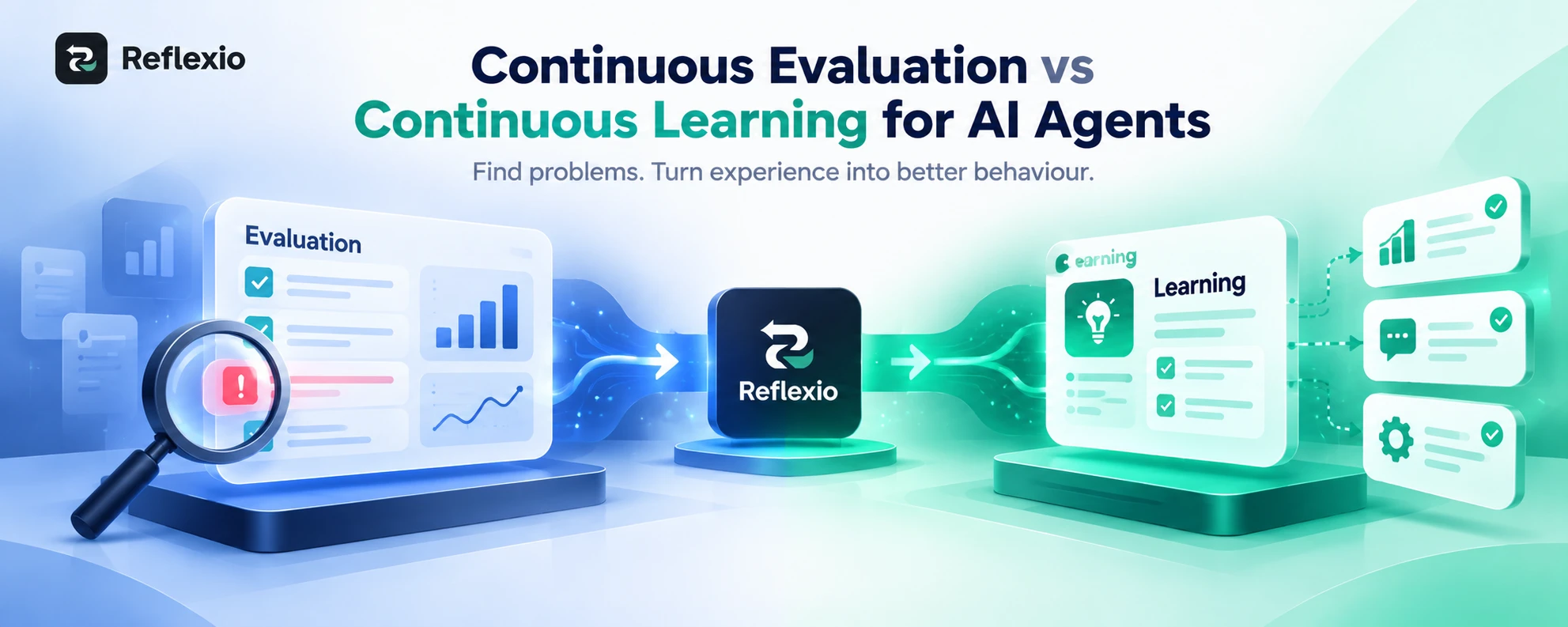
An AI agent can change after a new instruction, a better tool, or a useful lesson from a past task. But how do you know if the change actually made the agent better?
To measure AI agent behaviour improvement, you need to look beyond whether the agent gives the right answer. You also need to check how often it completes tasks, how many retries it needs, how much time and money it uses, and whether it keeps making the same mistakes.
This matters even more when an agent is used in real work. A change that helps with one task might cause problems with another. Without a clear way to measure results, teams can spend time improving an agent without knowing if the work is paying off.
Reflexio helps AI agents learn from real interactions, corrections, failures and successful outcomes. Measuring the results helps teams understand whether those learnings are leading to better behaviour over time.
In this guide, we will walk through how to set a starting point, choose the right AI agent evaluation metrics, compare results, and use those findings to make better decisions about your agent.
Step 1: Define What Better Behaviour Means
Before you measure anything, decide what you want your agent to do better.
The goal will depend on the job the agent performs. A coding agent and a customer support agent should not be judged in exactly the same way.
For example:
- A coding agent should fix problems without breaking working code.
- A customer support agent should solve requests without making users repeat themselves.
- A research agent should find useful information without wasting time on repeated searches.
For most AI agents, start with three questions:
- Does it complete the task correctly?
- Does it complete the task without unnecessary work?
- Does it use time and resources well?
These questions give you a starting point for measuring improvement. They also help you avoid a common mistake: treating faster work as better work, even when the results are worse.
Step 2: Measure Your Agent Before Making Changes
You cannot tell whether an agent improved if you do not know how it performed before the change.
This starting point is called a baseline. It is simply a record of the agent's current performance.
Here is how to create one.
- Choose a set of real tasks. Include common requests, difficult tasks and examples where the agent has failed before.
- Define success for each task. Decide what the agent must do for the task to count as complete.
- Record the results. Note whether the task succeeded, how many retries were needed, how long it took and how much it cost.
- Save the steps taken. Record tool calls, errors and changes to the agent's plan where your system allows it.
- Repeat tests where needed. AI agents can behave differently when given the same task, so one run may not tell the full story.
For example, you could test an agent on 100 tasks and record its results before changing its instructions or learning setup. After the change, run the same tasks under comparable conditions.
The number of tasks you need depends on how much the results vary and how important the decision is. The aim is to make a fair comparison, not to choose an arbitrary sample size.
This is also why repeatable agent execution matters. When tasks can be run and checked in a consistent way, teams have a clearer basis for comparing results.
Step 3: Choose the Right AI Agent Evaluation Metrics
Once you have a baseline, choose a small set of metrics that match your agent's job. Tracking too many numbers can make it harder to see what matters.
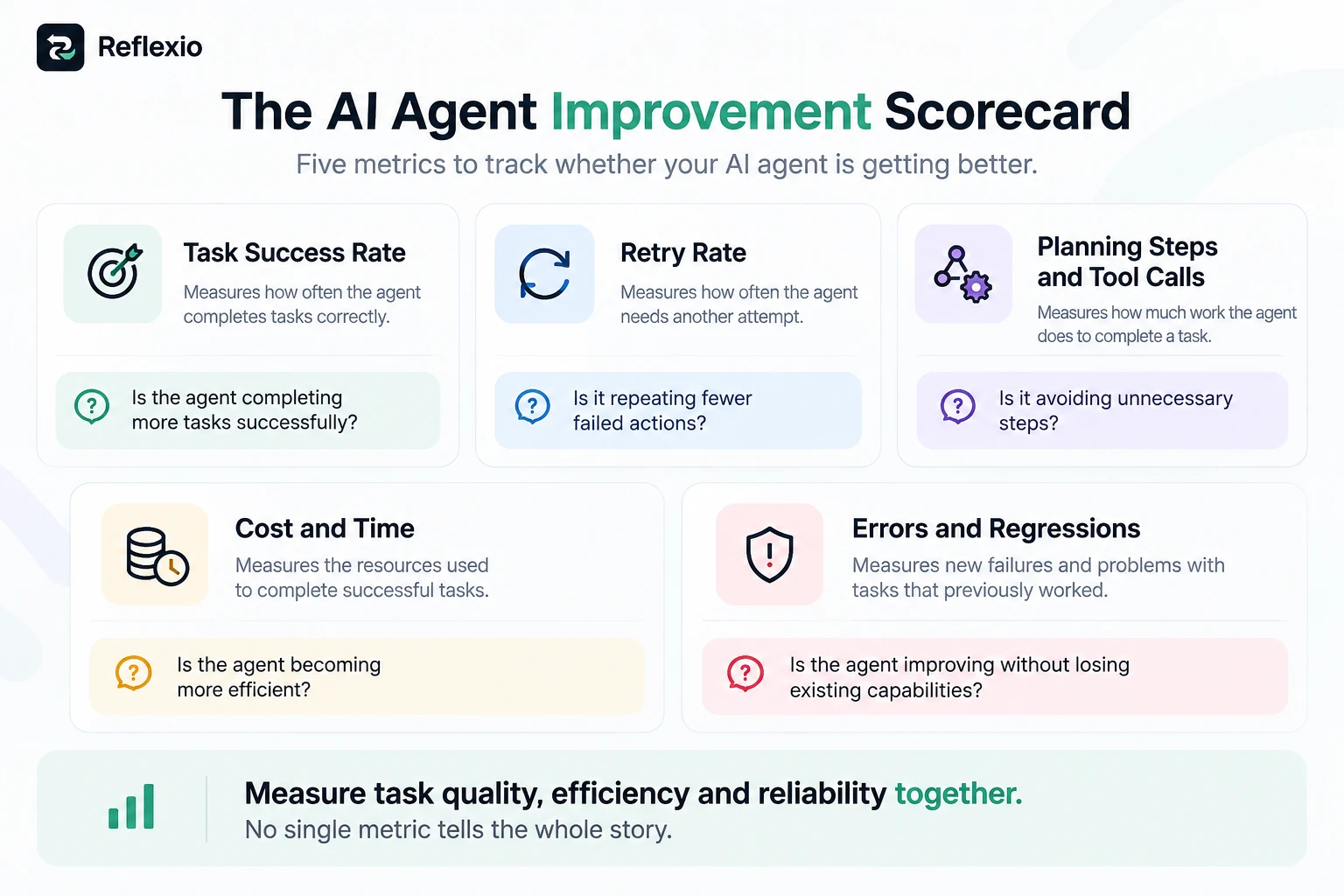
These five metrics are a useful starting point.
1. Task success rate
Task success rate tells you how often your agent completes a task correctly.
Use this formula:
Successrate=SuccessfultasksTotaltasks100
Suppose an agent completes 72 out of 100 tasks successfully. Its success rate is 72%.
After a change, it completes 84 out of 100 tasks. The rate rises to 84%.
That is a positive sign, provided the tasks and success rules stayed the same. For important tasks, check the actual result rather than relying only on the agent's own claim that it succeeded.
2. Retry rate
A retry happens when an agent attempts an action again because the first attempt did not work.
For example, a support agent tries to retrieve an order, receives an error, and repeats the same request three times.
Track how often retries happen and how many retries each task needs. You can calculate retry rate as the percentage of tasks that required at least one retry.
If retries decrease after a change, the agent may be handling tasks more effectively. But check that it is not simply giving up sooner or skipping steps it still needs.
3. Planning iterations and tool calls
Some agents make a plan, take an action, review the result and then decide what to do next. This process can be useful, but repeated planning may also waste time.
Track how many planning steps and tool calls the agent uses for each task.
For example, a research agent may search the same source several times without finding anything new. If it learns to recognise that situation and choose a better next step, it may complete the task with fewer calls.
Define what counts as a planning step or tool call in your own system. Different agent frameworks may record these actions in different ways.
4. Cost and time per successful task
A cheap run is not always a good run. An agent may use fewer resources because it stopped before completing the task.
Instead, track the cost of successful work.
Costpersuccessfultask=TotalexecutioncostSuccessfultasks
Also record how long successful tasks take to complete.
These measures help you see whether an agent is becoming more efficient without losing quality.
5. Error and regression rate
An improvement in one area can create a problem somewhere else. This is called a regression.
For example, a coding agent may become faster at fixing bugs but start breaking tests that previously passed.
Track the number of failed tasks, the types of errors and whether previously successful tasks still work. The right checks depend on what your agent does.
Microsoft's agent metrics reference is a useful additional resource for choosing measures across task outcomes, quality, productivity and business results.
Step 4: Compare Results Before and After a Change
Now you can compare the baseline with the results after a change to the agent.
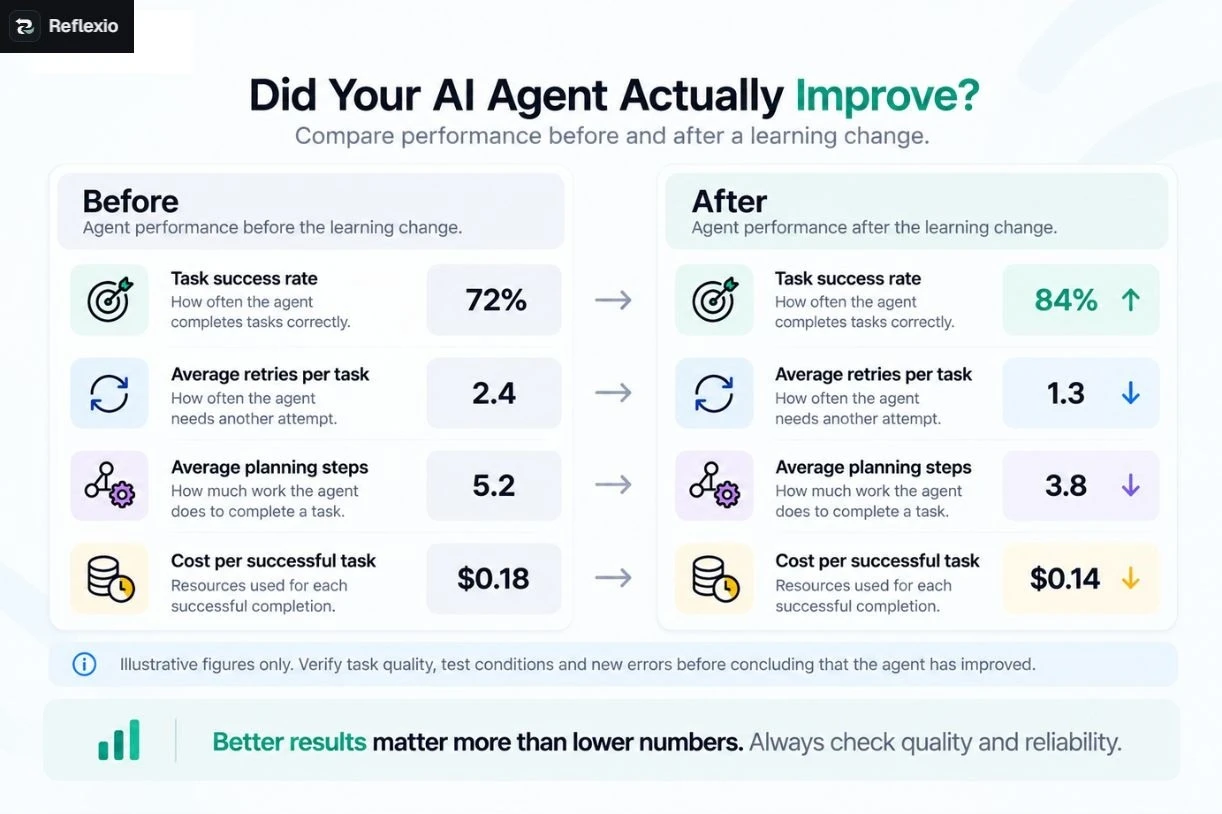
The following figures are an example, not real Reflexio customer data.
| Metric | Before | After |
| Task success rate | 72% | 84% |
| Average retries per task | 2.4 | 1.3 |
| Average planning steps | 5.2 | 3.8 |
| Cost per successful task | $0.18 | $0.14 |
At first glance, all four measures look better. The agent completes more tasks, retries less often, uses fewer planning steps and costs less per successful task.
But do not stop at the table.
Check whether the agent still handles difficult tasks correctly. Look for new errors, and make sure the test conditions were comparable.
You should also repeat tests when results vary from one run to another. One good result may be luck rather than a lasting change.
The goal is not to make every number go down. It is to improve the results that matter without damaging the others.
Step 5: Check Why the Results Changed
Metrics tell you what changed. They do not always explain why.
To understand the cause, inspect the record of what the agent did during a task. This may include the request, its decisions, tool calls, tool results, errors, retries and final outcome.
For example, imagine an agent's success rate improves, but its tool calls increase.
That could mean the agent is checking its work more carefully. It could also mean the agent is repeating actions it does not need.
The execution record helps you tell the difference.
When reviewing a task, ask:
- Did the agent choose the right tool?
- Did it use the tool correctly?
- Did it understand the result?
- Did it repeat an action unnecessarily?
- Did it recover from an error?
- Did it achieve the intended result?
This is important because the final answer does not always show the quality of the process that produced it.
For more technical guidance, read Anthropic's guide to evaluating AI agents. It explains how teams can test multi-step agent tasks, check individual actions and repeat trials to get more reliable results.
Step 6: Check Whether Learning Improves Future Tasks
A successful test shows that an agent can complete a task. It does not prove that the agent has learned to handle similar tasks better in the future.
To measure lasting improvement, test the agent on similar tasks after the change.
For example, imagine a support agent repeatedly fails when an order lookup returns a temporary error. After learning from previous interactions, it starts using a better recovery step.
The team should check whether the agent:
- Handles similar errors more successfully.
- Repeats the same failed action less often.
- Completes the task without skipping important checks.
- Applies the useful behaviour to other relevant tasks.
- Continues to perform well over time.
This is where Reflexio becomes especially useful.
Reflexio is an AI agent learning platform that helps agents learn from corrections, failures, successful outcomes and real interactions. Rather than treating every task as a fresh start, agents can use relevant learnings to improve how they handle similar tasks in the future.
The important part is measuring what happens next. If a learning is meant to reduce repeated API failures, the team should track those failures and the success rate of similar tasks before and after the learning is introduced.
Reflexio supports the learning process. Your evaluation results help establish whether that learning actually improved behaviour.
Step 7: Use Reflexio to Turn Learning Into Measurable Improvement
Measuring performance is only one part of improving an AI agent. Teams also need a way to help agents use what they learn from real work.
This is the problem Reflexio is designed to address.
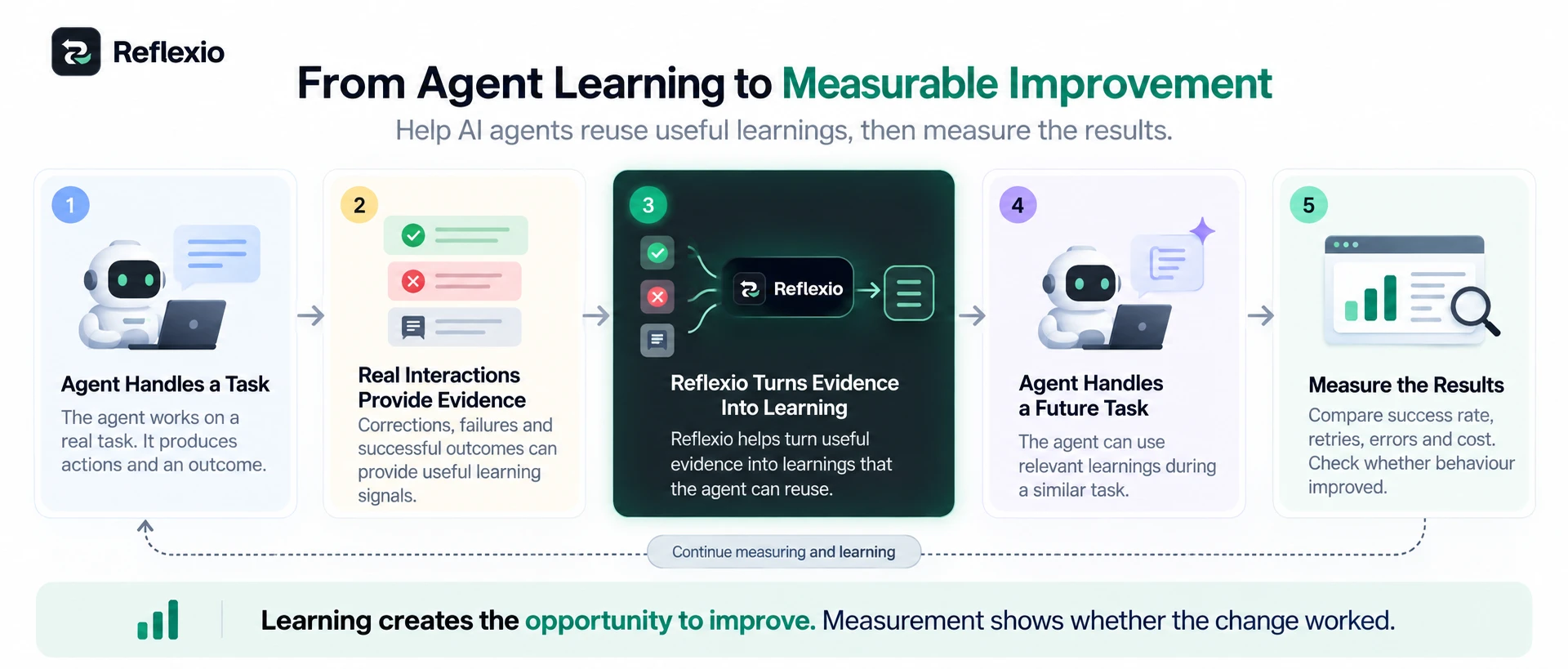
- Start with real interactions
The agent handles tasks and produces results. Corrections, failures and successful outcomes can provide useful evidence about its behaviour.
- Turn useful evidence into learning
Reflexio helps turn relevant interactions into learnings that the agent can reuse, rather than relying only on its original instructions.
- Measure the next results
Run relevant tasks again and compare success, retries, errors and cost. This helps the team see whether the new behaviour is making a difference.
- Check for unwanted changes
Make sure the agent has not introduced new errors or lost an ability that worked before.
The distinction matters. Saving a learning is not the same as proving that an agent has improved. The evidence comes from what the agent does with that learning in later tasks.
You can learn more about the Reflexio AI agent learning platform and explore Agent Dreaming vs Replay-Gated Tuning for more context on ways to improve agent behaviour.
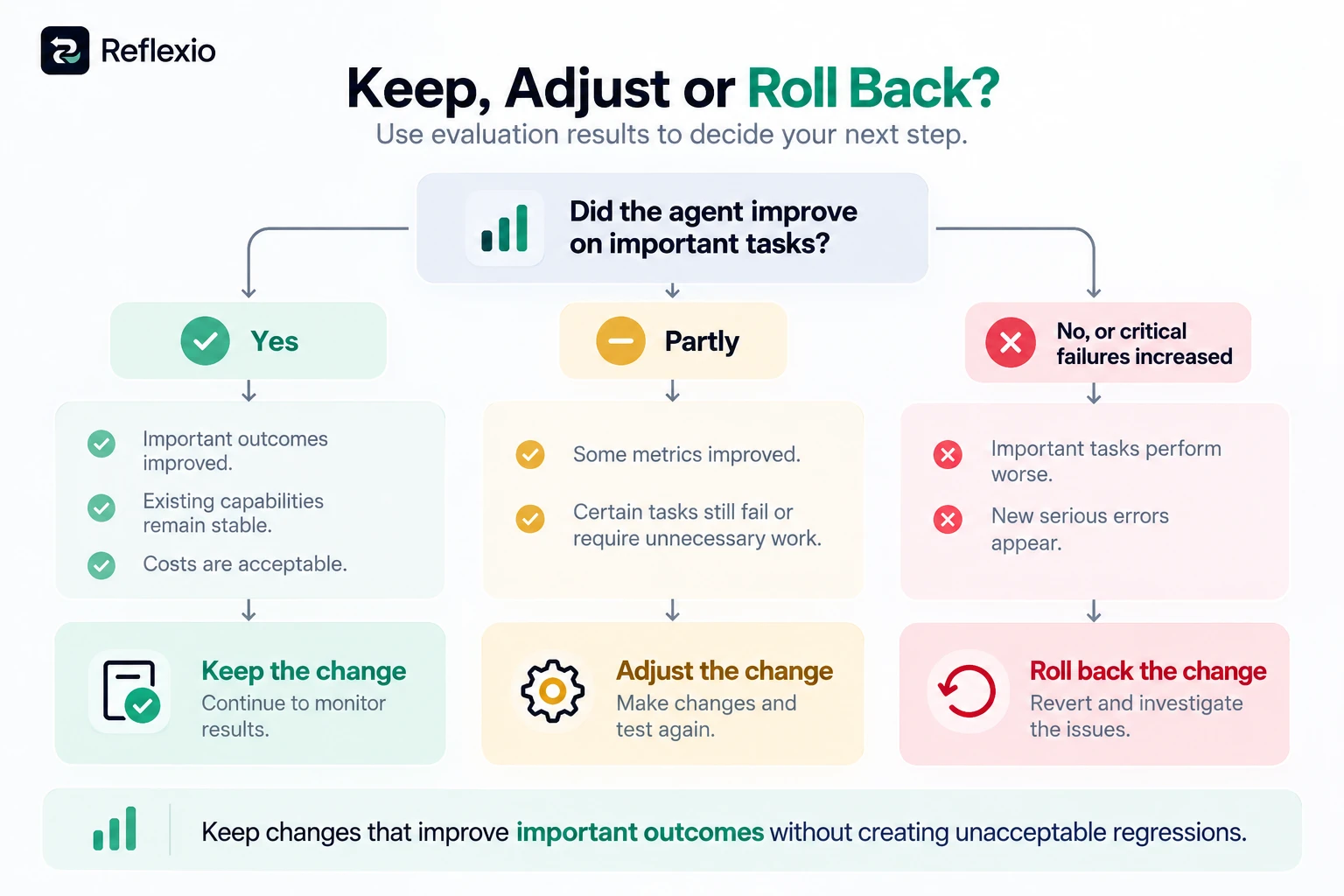
Step 8: Decide Whether to Keep or Change the Improvement
Once you have compared the results, you need to decide what to do next.
Use this simple checklist:
- Keep the change if important outcomes improve, costs remain acceptable and existing capabilities still work.
- Adjust the change if some results improve but the agent continues to make repeated errors or waste resources.
- Roll back the change if important tasks start failing or the agent develops a serious new problem.
For high-risk tasks, set stricter requirements. A small reduction in cost is not worth a change that causes important tasks to fail.
It also helps to keep a record of what changed, which tasks were tested and what the results showed. This makes future comparisons easier and helps the team understand which improvements worked.
Google Cloud's guide to evaluating generative AI systems provides further guidance on testing AI systems, from simple responses to more complex agent tasks.
Make AI Agent Improvement Measurable
To measure AI agent behaviour improvement, start by defining what success means. Record the agent's current performance, choose metrics that match its job, compare results fairly and inspect the actions behind those results.
Then check whether improvements last and whether the agent has developed new problems.
Reflexio helps agents learn from real interactions and reuse useful learnings. Measurement helps teams understand whether those learnings are making a real difference. Together, learning and evaluation give teams a clearer path towards more reliable AI agents.
The goal is not simply to make an agent faster or cheaper. It is to help it complete tasks correctly, avoid repeated mistakes and perform better over time.