

Evaluating Agent Performance
Choose between session A/B tests, response head-to-head comparisons, and retrieved-learning analysis.
Reflexio supports three complementary evaluation methods. Choose the method based on whether you want to measure session outcomes, compare two answers to the same question, or understand the learnings behind an answer.
All three methods use publish_interaction. Reflexio evaluates session success from the requests that share a session_id, using your success rubric plus the user turns, agent turns, and recorded tool use.
Evaluation is session-level
Session success is evaluated after a session becomes inactive. Head-to-head and retrieved-learning signals are attached to individual assistant interactions, then processed as part of that session evaluation.
Choose an Evaluation Method
source + evaluation_onlyA/B testing
Measure whether Reflexio improves success across separate control and test sessions.
- Publish
- A stable source for each arm and
evaluation_only=Trueon the no-Reflexio control arm. - Read
- Success, corrections, turns, and escalation metrics for each source set.
shadow_contentHead-to-head comparison
Judge the served response and an alternate response against the same user question.
- Publish
- The served answer in
contentand the alternate answer inshadow_content. - Read
- Regular wins, shadow wins, ties, and the per-turn comparison details.
retrieved_learningsRetrieved-learning analysis
Measure whether each profile or playbook applied to an answer was relevant and helpful.
- Publish
- Every injected learning as a stable
{kind, learning_id}reference on the assistant interaction. - Read
- Per-learning relevance and positive, negative, or neutral impact verdicts.
A/B and head-to-head answer different questions
A/B testing compares outcomes across separate sessions. Head-to-head comparison evaluates two responses to the same question on one assistant interaction. The evaluation_only flag controls learning eligibility; it is not a cohort label. Use source to label cohorts.
Configure Evaluation
Configure one success rubric before using any evaluation method. The rubric should describe the observable conditions that make a complete session successful. Add tool_can_use when tool choice is part of that judgment.
from reflexio import ReflexioClient
from reflexio.models.config_schema import AgentSuccessConfig, ToolUseConfig

client = ReflexioClient()
config = client.get_config()

config.agent_success_config = AgentSuccessConfig(
    success_definition_prompt="""
Evaluate whether the agent resolved the user's task.

Success means:
- The agent understood the user's goal.
- The answer or action directly addressed that goal.
- Any required next step was clear.
- The user did not need to correct, repeat, or escalate the request.
""",
    request_sources_enabled=[
        "prod_with_reflexio",
        "prod_without_reflexio",
    ],
    sampling_rate=1.0,
    evaluation_only_sampling_rate=1.0,
    retrieved_learning_sampling_rate=1.0,
)

config.tool_can_use = [
    ToolUseConfig(
        tool_name="search_docs",
        tool_description="Search product documentation for grounded answers.",
    ),
    ToolUseConfig(
        tool_name="create_ticket",
        tool_description="Create a support ticket when follow-up is required.",
    ),
]

client.set_config(config)
curl -X GET "${REFLEXIO_URL:-https://www.reflexio.ai}/api/get_config" \
-H "Authorization: Bearer $REFLEXIO_API_KEY" \
-o reflexio-config.json
# Update agent_success_config in the downloaded config object, then send
# the complete object back to Reflexio.
curl -X POST "${REFLEXIO_URL:-https://www.reflexio.ai}/api/set_config" \
-H "Authorization: Bearer $REFLEXIO_API_KEY" \
-H "Content-Type: application/json" \
--data @reflexio-config.json| Field | What it controls |
|---|---|
success_definition_prompt | The rubric used to decide whether the session succeeded. |
sampling_rate | Session-success coverage for normal publish traffic. The default is 0.05. |
evaluation_only_sampling_rate | Optional session-success coverage for evaluation-only traffic. null inherits sampling_rate. |
retrieved_learning_sampling_rate | Independent coverage for retrieved-learning judges. null inherits sampling_rate. |
request_sources_enabled | Optional allowlist of source values eligible for evaluation. |
tool_can_use | Root config list describing tools the agent could use. |
Use 1.0 during a controlled launch or audit window when every eligible session should be graded. Lower the rates for ongoing production monitoring. Set agent_success_config=None to disable automatic session-success evaluation.
A/B Testing
A/B testing measures Reflexio's effect across separate sessions:
| Arm | Agent behavior | Publish behavior |
|---|---|---|
| Control | Answer without Reflexio context. | Use a control source and set evaluation_only=True. The session is graded but excluded from profile and playbook learning. |
| Test | Retrieve Reflexio context, apply it, and serve the resulting response. | Use a test source and publish normally so the interaction can contribute to learning. |
The cURL examples illustrate publish payloads: replace learning placeholders with the IDs of context actually injected.
Assign sessions to arms at random and keep that assignment stable for the full session_id. Reflexio assigns the session to the source on its first request.
from reflexio import InteractionData, ReflexioClient

client = ReflexioClient()

# Control session: do not retrieve Reflexio context.
control_response = run_agent(user_message, context=[])
client.publish_interaction(
    user_id="user_123",
    session_id="session_control_001",
    source="prod_without_reflexio",
    agent_version="support-agent@2.1.0",
    evaluation_only=True,
    interactions=[
        InteractionData(role="User", content=user_message),
        InteractionData(role="Agent", content=control_response),
    ],
)

# Test session: retrieve Reflexio context and publish normally.
reflexio_context = client.search(
    query=user_message, user_id="user_456", session_id="session_test_001"
)
# Inject all returned learnings; record exactly the same subset.
retrieved_learnings = [
    *({"kind": "profile", "learning_id": p.profile_id} for p in reflexio_context.profiles),
    *({"kind": "user_playbook", "learning_id": str(p.user_playbook_id)}
      for p in reflexio_context.user_playbooks),
    *({"kind": "agent_playbook", "learning_id": str(p.agent_playbook_id)}
      for p in reflexio_context.agent_playbooks),
]
test_response = run_agent(user_message, context=reflexio_context)
client.publish_interaction(
    user_id="user_456",
    session_id="session_test_001",
    source="prod_with_reflexio",
    agent_version="support-agent@2.1.0",
    interactions=[
        InteractionData(role="User", content=user_message),
        InteractionData(role="Agent", content=test_response,
                        retrieved_learnings=retrieved_learnings),
    ],
)
# Control session
curl -X POST "${REFLEXIO_URL:-https://www.reflexio.ai}/api/publish_interaction" \
-H "Authorization: Bearer $REFLEXIO_API_KEY" \
-H "Content-Type: application/json" \
--data @- <<'JSON'
{
"user_id": "user_123",
"session_id": "session_control_001",
"source": "prod_without_reflexio",
"agent_version": "support-agent@2.1.0",
"evaluation_only": true,
"interaction_data_list": [
{"role": "User", "content": "Can you help me reset my password?"},
{"role": "Agent", "content": "Open Account Settings, then choose Security."}
]
}
JSON
# Test session
curl -X POST "${REFLEXIO_URL:-https://www.reflexio.ai}/api/publish_interaction" \
-H "Authorization: Bearer $REFLEXIO_API_KEY" \
-H "Content-Type: application/json" \
--data @- <<'JSON'
{
"user_id": "user_456",
"session_id": "session_test_001",
"source": "prod_with_reflexio",
"agent_version": "support-agent@2.1.0",
"interaction_data_list": [
{"role": "User", "content": "Can you help me reset my password?"},
{"role": "Agent", "content": "Open Account Settings, choose Security, then select Reset Password.",
"retrieved_learnings": [{"kind": "agent_playbook", "learning_id": "<returned agent_playbook_id>"}]}
]
}
JSONRead the cohort comparison
Request labeled source sets from POST /api/get_evaluation_overview:
curl -X POST "${REFLEXIO_URL:-https://www.reflexio.ai}/api/get_evaluation_overview" \
  -H "Authorization: Bearer $REFLEXIO_API_KEY" \
  -H "Content-Type: application/json" \
  --data @- <<'JSON'
{
  "from_ts": 1782864000,
  "to_ts": 1785456000,
  "bucket": "day",
  "include_shadow": false,
  "source_sets": [
    {
      "label": "Control",
      "sources": ["prod_without_reflexio"]
    },
    {
      "label": "Reflexio",
      "sources": ["prod_with_reflexio"]
    }
  ]
}
JSON
Read each arm under source_set_comparison.sets. Metrics include session count, success rate, corrections, turns to resolution, escalation, and rule attribution. See GetEvaluationOverviewRequest for the complete request and response shapes.
The same overview response also includes recent_results, the newest 100
session-level evaluation summaries in the requested window, and
source_set_comparison.source_sessions, which groups those evaluated session
IDs by their first-request source. Each group includes collision-safe
sessions entries with both user_id and session_id; use those entries when
filtering results because session IDs can be reused by different users.
Dashboard clients can render the initial overview, recent-session detail, and
source filters from this single response; request a labeled source_set only
when source-scoped aggregate metrics are needed.
Randomization determines what you can claim
With random session assignment, the source-set gap can support a causal lift measurement. If assignment depends on user type, geography, time, or another non-random rule, treat the comparison as observational.
Head-to-Head Comparison
Head-to-head comparison answers a narrower question: for this user message, which of two candidate responses was better?
Generate both responses from the same input. Put the response shown to the user in content and the alternate response in shadow_content. The labels describe payload position, not which response used Reflexio.
from reflexio import InteractionData, ReflexioClient

client = ReflexioClient()

context = client.search(
    query=user_message, user_id="user_123", session_id="session_002"
)
retrieved_learnings = [
    *({"kind": "profile", "learning_id": p.profile_id} for p in context.profiles),
    *({"kind": "user_playbook", "learning_id": str(p.user_playbook_id)}
      for p in context.user_playbooks),
    *({"kind": "agent_playbook", "learning_id": str(p.agent_playbook_id)}
      for p in context.agent_playbooks),
]
served_response = run_agent(user_message, context=context)
alternate_response = run_agent_without_reflexio(user_message)

client.publish_interaction(
    user_id="user_123",
    session_id="session_002",
    source="prod_with_reflexio",
    agent_version="support-agent@2.1.0",
    interactions=[
        InteractionData(role="User", content=user_message),
        InteractionData(
            role="Agent",
            content=served_response,
            shadow_content=alternate_response,
            retrieved_learnings=retrieved_learnings,
        ),
    ],
)
curl -X POST "${REFLEXIO_URL:-https://www.reflexio.ai}/api/publish_interaction" \
-H "Authorization: Bearer $REFLEXIO_API_KEY" \
-H "Content-Type: application/json" \
--data @- <<'JSON'
{
"user_id": "user_123",
"session_id": "session_002",
"source": "prod_with_reflexio",
"agent_version": "support-agent@2.1.0",
"interaction_data_list": [
{
"role": "User",
"content": "Can I place the same order as last time?"
},
{
"role": "Agent",
"content": "Yes. Your last order was one barbecue chicken pizza. Would you like that again?",
"shadow_content": "Yes. What would you like to order?",
"retrieved_learnings": [{"kind": "profile", "learning_id": "<returned profile_id>"}]
}
]
}
JSONThe comparison judge records whether the regular response won, the shadow response won, or the result was a tie. Use shadow_win_rate_trend from POST /api/get_evaluation_overview for aggregate win-rate analysis. Raw session results also expose regular_vs_shadow.
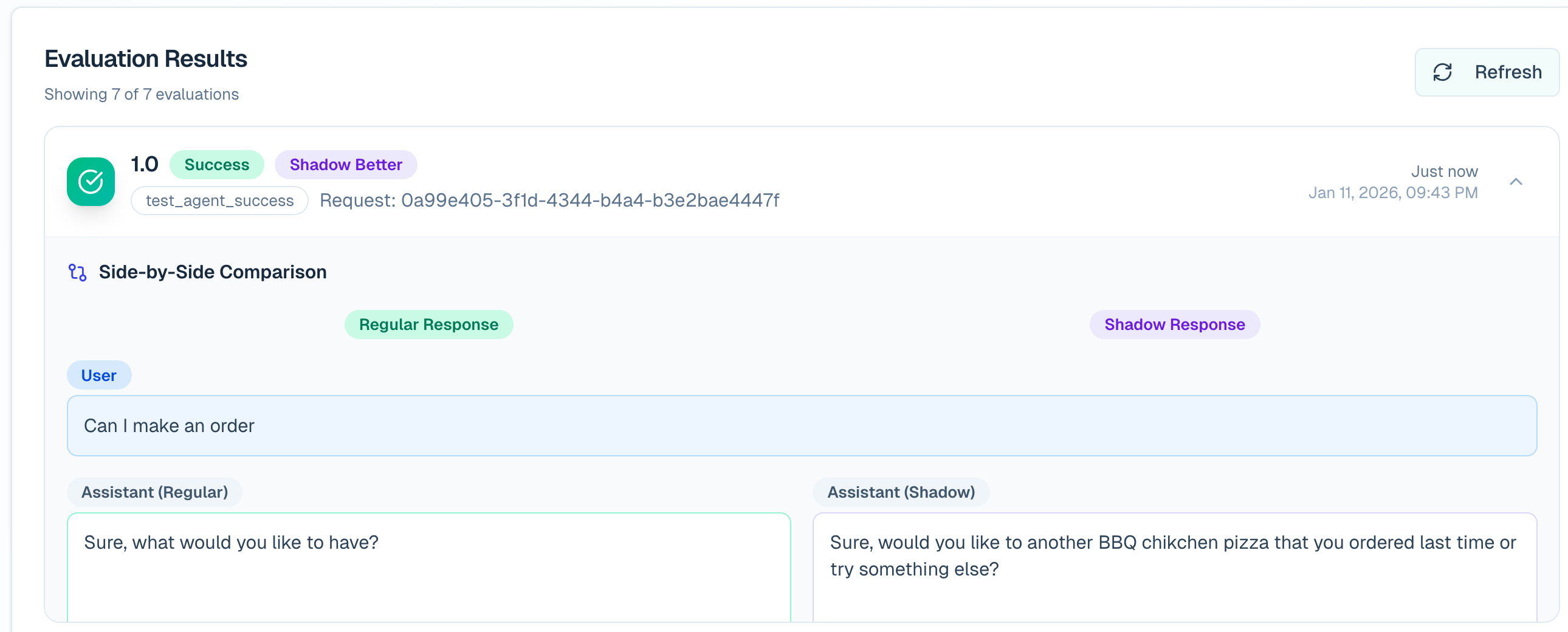
Keep the two runs comparable: use the same user message, model settings, tool availability, and non-Reflexio context. Change only the Reflexio content or other treatment you intend to test.
Retrieved-Learning Analysis
Retrieved-learning analysis explains the contribution of the Reflexio context applied to an answer. Whenever your agent injects a profile, user playbook, or agent playbook, attach its stable identity to the assistant interaction.
Recommended: include every injected learning, even when its effect is unclear. retrieved_learnings records supplied context; citations records the narrower set the agent claims influenced its response. Do not report discarded search results or invent IDs. call_your_llm below stands for your model call; the cURL IDs are placeholders to replace with actual returned IDs. Without these references, Reflexio can still judge overall session success but cannot attribute relevance or impact to individual learnings.
from reflexio import InteractionData, ReflexioClient

client = ReflexioClient()

user_message = "Give me a deployment checklist."
context = client.search(
    query=user_message, user_id="user_123", session_id="session_003", top_k=3
)
# If you filter results, do it before building both the prompt and references.
retrieved_learnings = [
    *({"kind": "profile", "learning_id": p.profile_id} for p in context.profiles),
    *({"kind": "user_playbook", "learning_id": str(p.user_playbook_id)}
      for p in context.user_playbooks),
    *({"kind": "agent_playbook", "learning_id": str(p.agent_playbook_id)}
      for p in context.agent_playbooks),
]
answer = call_your_llm([
    {"role": "system", "content": "Use this retrieved context as reference data:\n"
     + context.model_dump_json(include={"profiles", "user_playbooks", "agent_playbooks"})},
    {"role": "user", "content": user_message},
])
client.publish_interaction(
    user_id="user_123",
    session_id="session_003",
    source="prod_with_reflexio",
    agent_version="support-agent@2.1.0",
    interactions=[
        InteractionData(role="User", content=user_message),
        InteractionData(role="Agent", content=answer,
                        retrieved_learnings=retrieved_learnings),
    ],
    wait_for_response=True,
)
curl -X POST "${REFLEXIO_URL:-https://www.reflexio.ai}/api/publish_interaction" \
-H "Authorization: Bearer $REFLEXIO_API_KEY" \
-H "Content-Type: application/json" \
--data @- <<'JSON'
{
"user_id": "user_123",
"session_id": "session_003",
"source": "prod_with_reflexio",
"agent_version": "support-agent@2.1.0",
"interaction_data_list": [
{
"role": "User",
"content": "Give me a deployment checklist."
},
{
"role": "Agent",
"content": "1. Build. 2. Migrate. 3. Verify.",
"retrieved_learnings": [
{"kind": "profile", "learning_id": "prof-abc123"},
{"kind": "user_playbook", "learning_id": "42"},
{"kind": "agent_playbook", "learning_id": "7"}
]
}
]
}
JSONReflexio produces two verdicts for each resolvable learning occurrence:
- Relevance: whether the learning applied to the target interaction and response.
- Impact: whether the learning moved the response toward success (
positive), away from success (negative), or did not materially change it (neutral).
The same learning used on two responses is evaluated separately against each response. Duplicate references on one response are deduplicated. Deleted learning rows are skipped because their content is no longer available to the judge.
Read learning verdicts
After publishing the completed session, grade it explicitly for an immediate
check. Automatic evaluation is asynchronous and sampled; wait_for_response=True
waits for publish-time processing, not the inactivity-based evaluation.
On-demand grading runs LLM judges and may incur cost.
grade = client.grade_on_demand(
    session_id="session_003", agent_version="support-agent@2.1.0",
)
print("Status:", grade.retrieved_learning_status)
print("Skipped:", grade.skipped_reason, "Cached:", grade.cached)
verdicts = client.get_retrieved_learning_evaluation_results(
    user_id="user_123",
    session_id="session_003",
    limit=100,
)

for verdict in verdicts.results:
    print(
        verdict.interaction_id,
        verdict.kind,
        verdict.learning_id,
        verdict.is_relevant,
        verdict.impact,
    )
    print("Relevance reason:", verdict.relevance_reason)
    print("Impact reason:", verdict.impact_reason)
curl -X POST "${REFLEXIO_URL:-https://www.reflexio.ai}/api/evaluations/grade_on_demand" \
-H "Authorization: Bearer $REFLEXIO_API_KEY" \
-H "Content-Type: application/json" \
--data '{"session_id": "session_003", "agent_version": "support-agent@2.1.0"}'
curl -X POST "${REFLEXIO_URL:-https://www.reflexio.ai}/api/get_retrieved_learning_evaluation_results" \
-H "Authorization: Bearer $REFLEXIO_API_KEY" \
-H "Content-Type: application/json" \
--data '{"user_id": "user_123", "session_id": "session_003", "limit": 100}'The Evaluation page groups verdicts by interaction so a response counts once in the displayed percentages. Read the RetrievedLearningEvaluationResult schema when you need per-learning reasons or timestamps.
Monitor quality and diagnose missing results
| Signal | How to use it |
|---|---|
is_relevant and relevance_reason | Inspect irrelevant context; the learning may not apply to this particular turn. |
impact and impact_reason | Inspect negative verdicts first, then neutral ones. Relevance alone does not mean the learning improved the answer. |
retrieved_learning_status | complete means grading completed; degraded or failed is a grading problem, not a negative learning verdict. not_applicable means there were no eligible learnings to judge. Inspect other nonterminal statuses before relying on old readback rows. |
| Null verdicts or empty results | Null means ungraded, not false or neutral. Check grade status, user/session filters, stable IDs, deleted learnings, and whether context was injected at all. |
| Coverage and sampling | Track how many responses and learning occurrences were judged, alongside the sampling rate and time window. A small sample is not a quality trend. |
The read endpoint returns the latest persisted session verdicts, not a history of grading runs. Check the latest grade status as well as the returned rows. For production monitoring, use the Evaluation dashboard's response-level metrics and expand individual responses to inspect the underlying learning reasons. The dashboard percentages count each response once; they are not percentages of raw learning-verdict rows. Judge verdicts help diagnose retrieval, but do not by themselves prove causal improvement; use a randomized A/B experiment for that.
How Evaluation Runs
When an eligible interaction is published:
- Reflexio stores the request and interactions.
- Session-success and retrieved-learning judges pass through independent deterministic sampling gates.
- Reflexio waits for session inactivity, then evaluates the full session. The default inactivity delay is 10 minutes after its latest request.
- Reflexio stores session results plus any shadow and retrieved-learning verdicts requested by the published data.
Publishing another request with the same session_id moves the scheduled evaluation later. Sampling happens once per session. A session is scheduled when either judge family samples it, and only the sampled judge families run.
Evaluation-only requests are stored and graded but excluded from profile extraction, playbook extraction, and aggregation. The flag requires a non-empty session_id, cannot be combined with force_extraction=True, and must remain consistent across all publishes in a session.
Grade or Regenerate Explicitly
Automatic evaluation waits for session inactivity. Use these endpoints when you need a result sooner or need to re-score existing sessions.
| Action | API | Use it when |
|---|---|---|
| Grade one session nowImmediate | POST /api/evaluations/grade_on_demandCached for 24 hours per session and agent version. | A UI, demo, launch check, or operations tool needs a result before the inactivity delay. |
| Re-score a time windowHistorical | POST /api/evaluations/regenerateGET /api/evaluations/regenerate/{job_id}Returns a job id for status polling. | The success rubric, evaluator model, prompt, or analysis window changed. |
import time

grade = client.grade_on_demand(
    session_id="session_003",
    agent_version="support-agent@2.1.0",
)

job = client.regenerate_evaluations(
    from_ts=int(time.time()) - 7 * 24 * 60 * 60,
    to_ts=int(time.time()),
)

status = client.get_evaluation_regeneration_status(job.job_id)
curl -X POST "${REFLEXIO_URL:-https://www.reflexio.ai}/api/evaluations/grade_on_demand" \
-H "Authorization: Bearer $REFLEXIO_API_KEY" \
-H "Content-Type: application/json" \
--data '{"session_id": "session_003", "agent_version": "support-agent@2.1.0"}'
curl -X POST "${REFLEXIO_URL:-https://www.reflexio.ai}/api/evaluations/regenerate" \
-H "Authorization: Bearer $REFLEXIO_API_KEY" \
-H "Content-Type: application/json" \
--data '{"from_ts": 1782864000, "to_ts": 1785456000}'Inspect Session Results
Use get_agent_success_evaluation_results for raw session-level outcomes:
response = client.get_agent_success_evaluation_results(
    agent_version="support-agent@2.1.0",
    limit=100,
)

for result in response.agent_success_evaluation_results:
    print(
        result.session_id,
        result.is_success,
        result.failure_type,
        result.failure_reason,
        result.tags,
    )
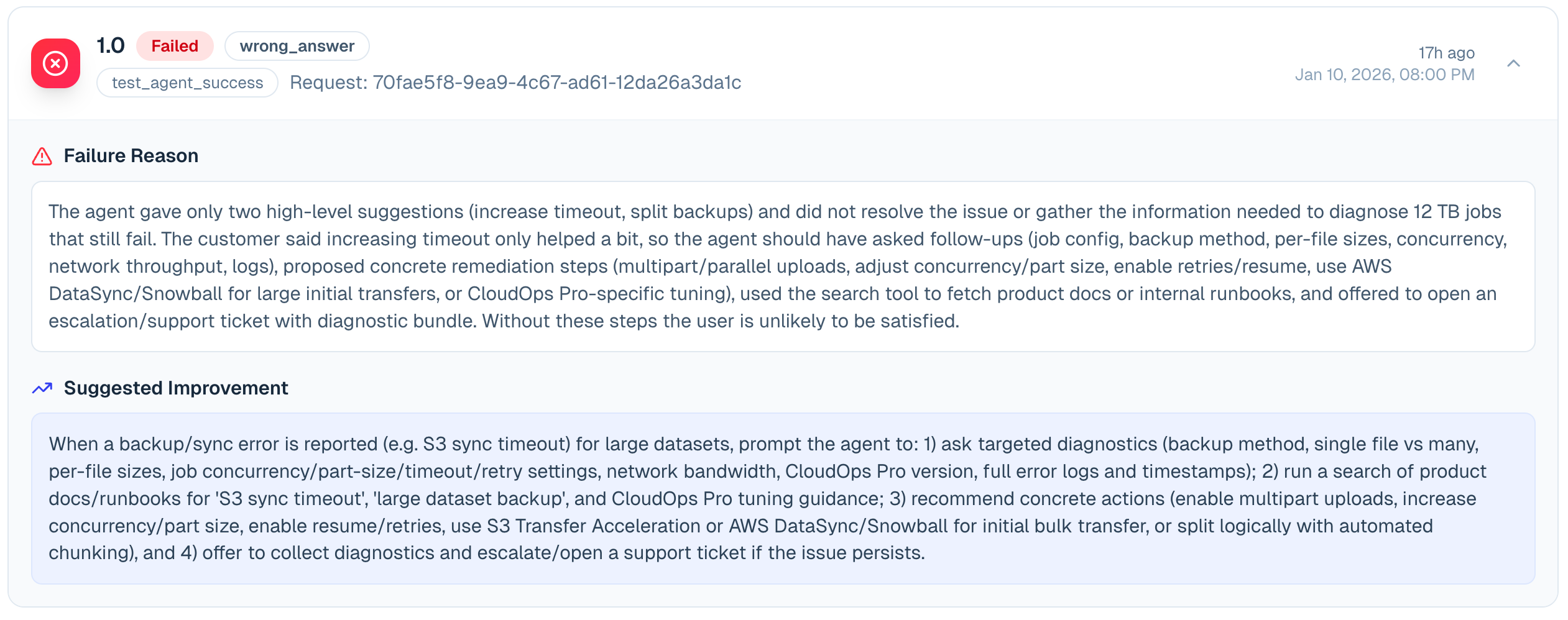
Important fields include is_success, failure_type, failure_reason, number_of_correction_per_session, user_turns_to_resolution, is_escalated, tags, regular_vs_shadow, agent_version, user_id, and session_id.
For dashboards already loading POST /api/get_evaluation_overview, use its
recent_results field for the newest 100 results in that window. The raw
results endpoint remains available when you need an independent result query
or agent-version filter.
When AgentSuccessConfig.tagging_definition_prompt is configured, Reflexio tags each persisted evaluation summary asynchronously. tags=None means tagging has not completed yet; tags=[] means the pass completed without a match. Tagging uses only the stored outcome summary, not the raw transcript.
number_of_correction_per_session is the judge's count of user turns that
corrected or redirected an earlier agent response. A qualifying turn must
identify an earlier response as incorrect, incomplete, insufficient, or
misaligned and steer a revision. Topic continuity alone does not make a turn
corrective: a new question, a separate deliverable, an ordinary follow-up, or
an answer to the agent's clarification question does not count. Several issues
raised in one user turn count once; later corrective turns count separately.
The judge computes this independently from final success, so a successful
session can still have one or more corrections.
Playbook diagnosis and tuning
Retrieved-learning impact evaluation also diagnoses playbooks. Expand an interaction on Evaluations to see the category, explanation, and cited interaction IDs alongside the existing relevance and impact verdicts. Profiles do not receive playbook diagnoses.
| Diagnosis | Meaning for tuning |
|---|---|
content_defect | The instructions themselves are wrong, contradictory, stale, or incomplete within their existing scope. A supported diagnosis can contribute negative evidence. |
application_failure | Evidence supports that the instructions were appropriate but were not applied effectively. This includes unused or misapplied guidance without assuming why it was not used. Do not count this as a reason to rewrite it. |
external_failure | A tool, environment, or unrelated task failure explains the problem. |
no_issue | No supported instruction defect. |
unknown | Evidence is insufficient or ambiguous. |
Playbook generation and evaluation sampling are unchanged. A playbook generated during an
unsampled session can still accumulate evidence when it is used and evaluated later.
Diagnosis uses the existing impact-judge call; it does not start a separate revision job
or add a candidate/critique loop. Keep publishing retrieved_learnings when your agent
uses Reflexio context. There is no new customer telemetry requirement for diagnosis.
The enterprise offline tuner owns revisions — and on a prepared deployment it now
runs: once the configuration reset has completed, the capability reports ready and
revisions follow the evidence. Diagnosis is optional:
previously eligible historical evaluations remain usable without it or a backfill.
Missing, unknown, uncited, incomplete, unverified, or mismatched diagnosis leaves existing
eligibility unchanged. A verified diagnosis of an application, external, or
no-issue case excludes that example from the negative revision pool. To influence tuning,
diagnosis must be signed with its cited interaction IDs, complete-input marker, and evaluated
playbook digest matching the one recorded at retrieval time. Existing signed-impact,
freshness, and attribution requirements still apply independently.
A retrieval result alone does not establish what reached the agent's prompt.
application_failure therefore describes appropriate guidance not being applied, without
distinguishing context omission from agent behavior. Non-use alone does not prove the
guidance was correct. When its appropriateness or application cannot be established,
use unknown.
The existing evidence requirements remain: at least three qualifying negative sessions, two positive sessions, and sufficient attribution/reconstruction coverage. Those thresholds have not moved, but note what reconstruction coverage now counts: a session left out for being too large to show an analyst is intact, so it counts as covered rather than as unreconstructable. Only a session that genuinely could not be rebuilt lowers the ratio.
Counting as covered is not the same as being usable. A session excluded on size is still excluded everywhere its content would have been read: it is never selected into an evidence bundle and no analyst ever sees it — it neither supports nor refutes, so admitting it would raise coverage for evidence that had not actually improved. Read the ratio as "nothing here is corrupt", not as "everything here is available". A candidate receives the selected diagnoses, but publication still requires the cited held-out reduction and the existing safety checks. A diagnosis by itself never edits a user playbook, pending agent playbook, or approved agent playbook. Agent-playbook review and GEPA workflows are unchanged.
This does not by itself enable the offline tuner. Its existing
offline_tuner_config and capability restrictions still apply, and two words that are
easy to conflate mean different things here. Supported is about DEPLOYMENT_MODE:
managed platform and self-hosted deployments are both supported, and only an
unrecognised mode reports deployment_unsupported. Available is about whether a
given deployment can run the tuner at all: both modes report config_reset_incomplete
until their configuration reset has run, and ready once it has. Diagnosis remains
available either way, and a ready deployment still tunes nothing until the
organization switches tuning on and reports session outcomes.
API Map
| Task | API or SDK surface |
|---|---|
| Publish any evaluation input | publish_interaction |
| Compare A/B source sets and shadow trends | POST /api/get_evaluation_overview |
| Read raw session outcomes | get_agent_success_evaluation_results |
| Read per-learning verdicts | get_retrieved_learning_evaluation_results |
| Grade one session immediately | grade_on_demand |
| Re-score a historical window | regenerate_evaluations |